
License fixer
The License fixer lists every asset the app considers
unlicensed, grouped by folder,
with whatever evidence it can find on disk, and lets you resolve a whole folder
at a time. Once it’s empty, every exported CREDITS.md is complete.
Open it
Section titled “Open it”- Click Health → Unlicensed in the sidebar. The number next to it is how many assets need a license.
- Run Open license fixer from the command palette.
- Click Fix… next to the “no license” warning in the export dialog.
The fixer takes the place of the grid. Click Close or press Esc to go back; clicking anything in the sidebar or searching also returns to the grid.
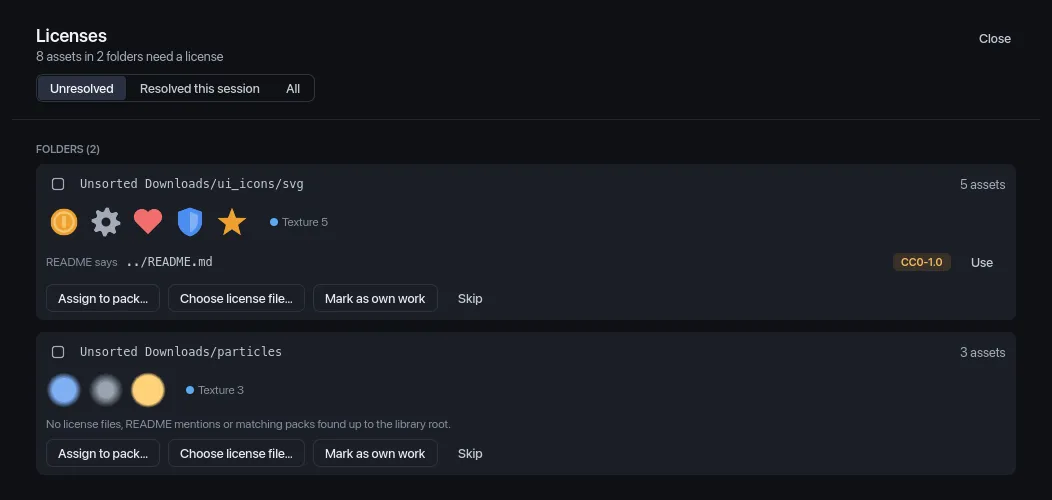
The header says how many assets in how many folders need a license, plus how many folders you’ve skipped or resolved since you opened it. Below it, three tabs:
- Unresolved: folders still to do (skipped ones are hidden).
- Resolved this session: folders you’ve fixed since opening the fixer, each with what you applied (“Resolved: Pack · Retro Sound Effects”).
- All: both, skipped folders included.
Archived assets and missing files aren’t listed.
How assets are grouped
Section titled “How assets are grouped”Each card is one folder: the unlicensed assets that sit directly in it. Subfolders get their own cards. Cards are ordered by size, largest first. Each card shows:
- a checkbox for bulk actions,
- the folder, as library folder/subfolder (hover for the full path),
- how many assets it holds, up to five thumbnails and the most common types,
- up to three pieces of evidence, strongest first,
- the actions.
At most 60 cards are shown at once (“Showing 60 of N folders. Resolve these to see the rest.”).
Evidence
Section titled “Evidence”The fixer looks in the folder and in every parent folder up to the library folder. Each line of evidence has a Use button that applies it.
| Line | What it is |
|---|---|
Found ../../LICENSE.txt |
A file whose name starts with LICENSE, LICENCE, COPYING or CREDITS. |
README says ../README.md “License: CC0…” |
A README that mentions a license. The quote is the first line that does. |
| Similar pack Pack “Kenney Nature Kit” | A pack you already have whose name matches one of the folder names on the way up (ignoring case, spaces and punctuation, or one name containing the other). |
When the text names a license the app recognizes, a badge shows its
SPDX id, such as
CC0-1.0.
Evidence is ranked by how likely it is to be right:
- License files rank highest, more so when their license is recognized, and a little lower for every folder level they’re above the assets.
- READMEs rank lower than license files: a README might describe something else.
- Similar packs rank lowest, and an exact name match ranks above a partial one.
When the top piece of evidence is a license file close to the folder, the card also gets a Use detected license button that applies it. READMEs and similar packs never get that button; check them, then click their Use.
If nothing turns up, the card says “No license files, README mentions or matching packs found up to the library root.”
Actions
Section titled “Actions”| Button | What it does |
|---|---|
| Use detected license | Applies the strongest evidence (only shown when it’s strong enough). |
| Use (on an evidence line) | Applies that line: a license file or README becomes the license file of every asset in the folder; a similar pack takes them in as members. |
| Assign to pack… | A menu of your packs, then Create pack from folder…. Picking a pack makes the folder’s assets members of it. |
| Choose license file… | A file picker that opens in the folder. Pick any file and click Use file; it becomes the license file of every asset in the folder. |
| Mark as own work | No attribution required. The assets are listed under Own Work in CREDITS.md. |
| Skip | Leaves the folder unresolved and hides it until you reopen the fixer. |
A license file you apply is remembered for each asset and survives rescans.
The inspector’s license card and the export’s CREDITS.md use it. If the
file is inside the library folder, it’s remembered relative to it, so moving
the whole library keeps it working.
Resolved cards fade out, the sidebar’s Unlicensed count drops, and the status bar says “Licenses: N assets resolved”.
Create pack from folder
Section titled “Create pack from folder”Assign to pack… → Create pack from folder… opens the pack dialog to make a new pack and put the folder’s assets in it:
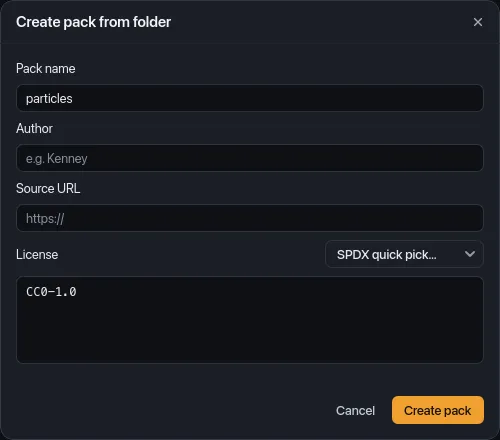
- Pack name starts as the folder’s name. It’s required.
- License starts as the SPDX id of the folder’s strongest evidence, when there’s strong enough evidence with a recognized license.
- SPDX quick pick… fills License with a common id:
CC0-1.0,CC-BY-4.0,CC-BY-SA-4.0,CC-BY-3.0,MIT,OFL-1.1,Apache-2.0orGPL-3.0. - Add the Author and Source URL if you know them;
CREDITS.mdcredits them.
Click Create pack. Started from the bulk bar, it makes one pack for all the selected folders.
Packs with an empty license field
Section titled “Packs with an empty license field”Assets in a pack count as licensed even when the pack’s License field is empty, so they can’t show up as folders here. Instead, those packs are listed at the top under Packs with an empty license field, with how many assets they have. Click Edit pack… to fill in the license (the dialog is titled Edit pack; click Save). The status bar says “Pack updated.”
Resolve several folders at once
Section titled “Resolve several folders at once”Tick the checkbox on several cards. A bar appears with “N folders selected” and:
- Use detected licenses: applies each selected folder’s strongest evidence, when it’s strong enough. Folders without strong evidence are left as they are. Disabled when none of them have any.
- Assign to pack…: puts every selected folder in one pack, existing or new.
- Mark as own work
- Skip
- Clear selection
License fixer actions aren’t on the undo stack, and Cmd/Ctrl+Z right after one undoes whatever undoable action came before it, not the fix. Check the evidence before you click.
- A pack you created by mistake: remove it with Remove pack info… in Settings → Folders + packs (it shows in its folder’s Pack column when it holds most of that folder’s assets). Its assets become unlicensed again and come back to the fixer.
- A wrong pack, license file or Mark as own work: there’s no way to reverse these in the app yet. A resolved folder no longer appears in the fixer, so you can’t apply something else to it either.
When the list is empty
Section titled “When the list is empty”With nothing left, the fixer says Every asset has a license: “Each asset belongs to a pack, has a license file nearby, or is marked as your own work. CREDITS.md will be complete.”
For a step-by-step example, see the Fix missing licenses tutorial.